BUILT FOR SEEDANCE 2.0 / 2.5 — MAC / WINDOWS

Words, cut to picture.
Turn a plan into a prompt you can run.

Cutline Studio folds references, characters, timeline, audio, and end state into one Seedance prompt, then runs 25 static checks to catch what is missing before you send it. It does not generate video. It takes care of everything that comes first.

Buy Cutline Studio (JPY 980) Try the free edition first The trial has no time limit and nothing removed. The only difference is the AI features. / Version 1.0.6
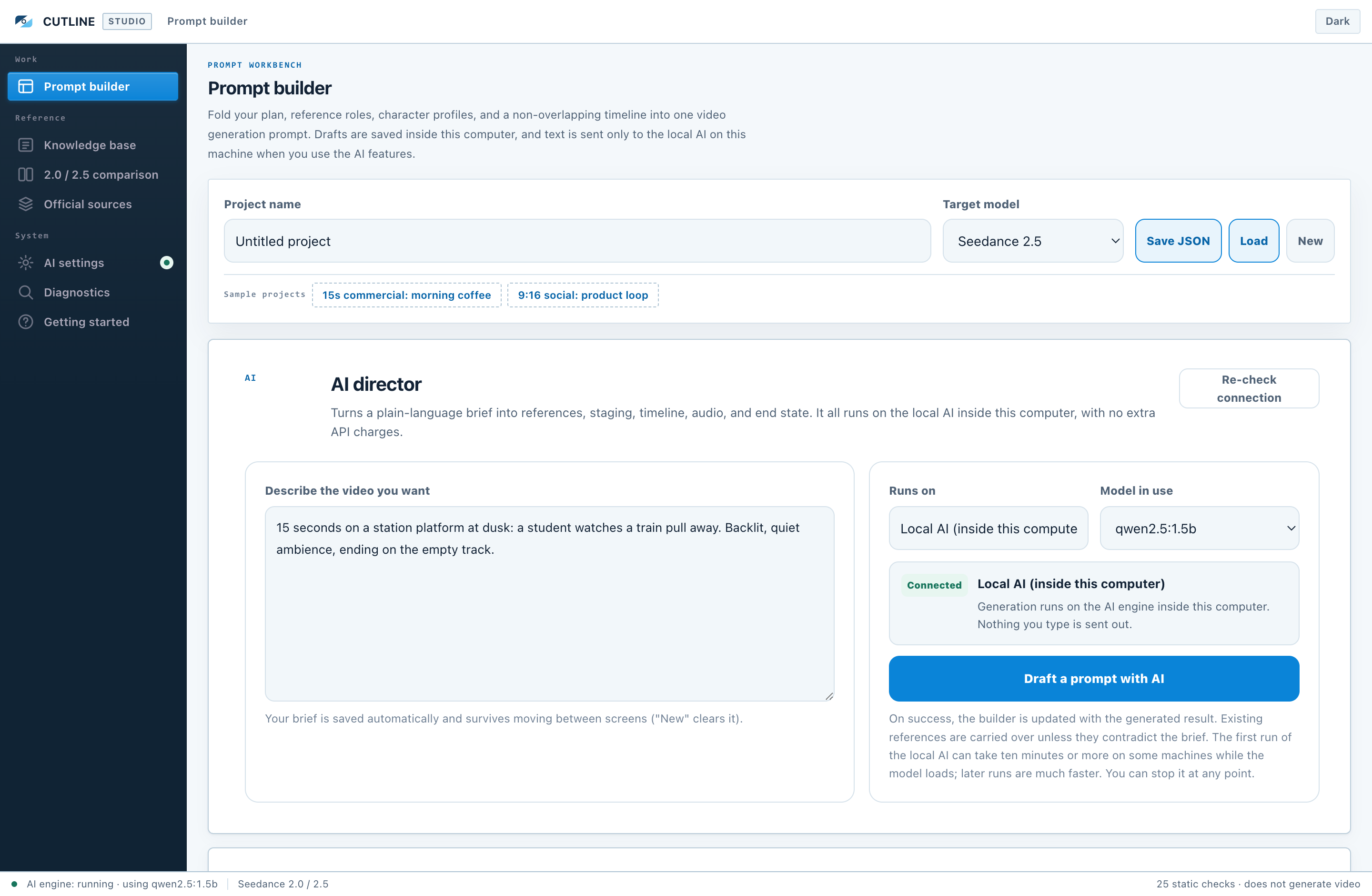
The Cutline Studio prompt builder

Your OS will show a security warning when you install. Nothing is broken.

The app does not carry a paid code signature, so the OS reports that it cannot verify the publisher. These steps get you through it. Please read this before buying.

Windows

"Windows protected your PC"
More infoRun anyway

Mac

"cannot verify the developer"
right-click the app → OpenOpen again

On a Mac this is only needed the first time; after that a normal double-click works. Step-by-step instructions with screenshots are in the Studio manual and the Free manual.

The Problem

Is more of your time going into organising the prompt than into generating?

A Seedance prompt carries more information to manage than to write. Hold it all in your head and something slips. Generate with something missing and all you get is another generation.

Before / After

Before and after

BEFORE — managed by hand

  • Prompts kept in notes and scattered fragments of text
  • Model specifications looked up again every time
  • Gaps found after the generation
  • No way to tell 2.0 rules from 2.5 rules in your own notes
  • Old plans cannot be picked up again

AFTER — CUTLINE STUDIO

  • References, characters, and timeline structured on one screen
  • 2.0 / 2.5 specifications built in with verification dates, one click to switch
  • Gaps flagged by 25 static checks before you send
  • A local AI drafts the whole plan from one paragraph (paid edition)
  • Plans saved, restored, and carried around as JSON

Features

Four things that take the organising off your hands

1

Model specifications switch themselves

Switch the target model between 2.0 and 2.5 and the duration, ratios, reference limits, and prompt structure all follow. Every value carries the date it was verified in the vendor's own documentation.

2

References and characters, mapped

Register "@Image 1 = character A's appearance, do not take the background" on screen and the prompt writes itself accordingly. The asset files themselves are never stored or transmitted.

3

25 static checks

Overlapping beats, missing reference numbers, dialogue that will not fit the duration, and "language nothing can observe" — phrasing that gives the model no instruction — all flagged before you send.

4

A local AI that drafts for you

The paid edition drafts a whole plan from one paragraph, using an AI that runs inside your computer. No usage fees, nothing sent out, works offline. Setting it up is one button inside the app.

Screens

The actual screens

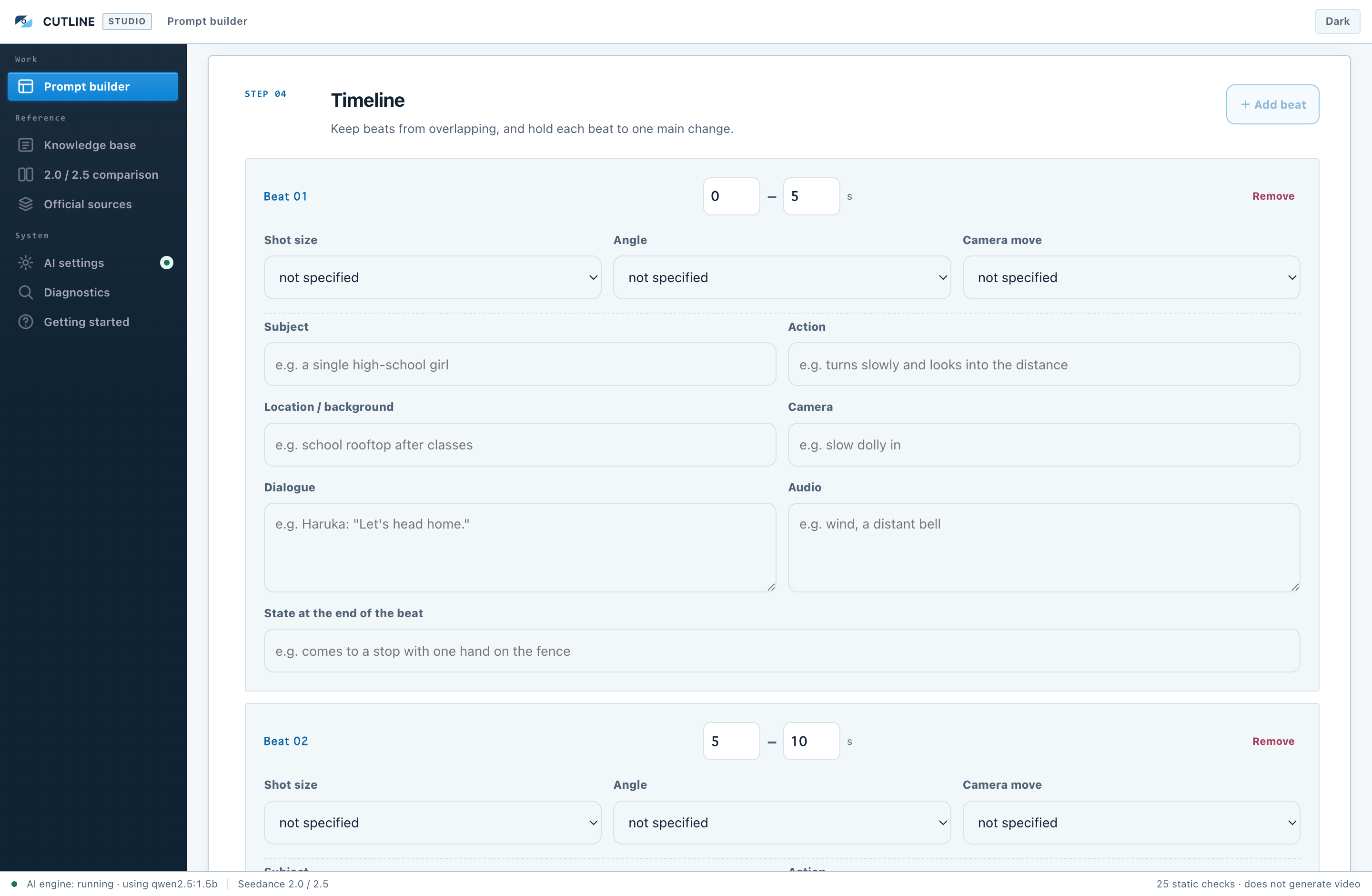
The timeline editor
Timeline — design what happens, the camera, and the sound beat by beat. The checks watch that it all fits the duration.
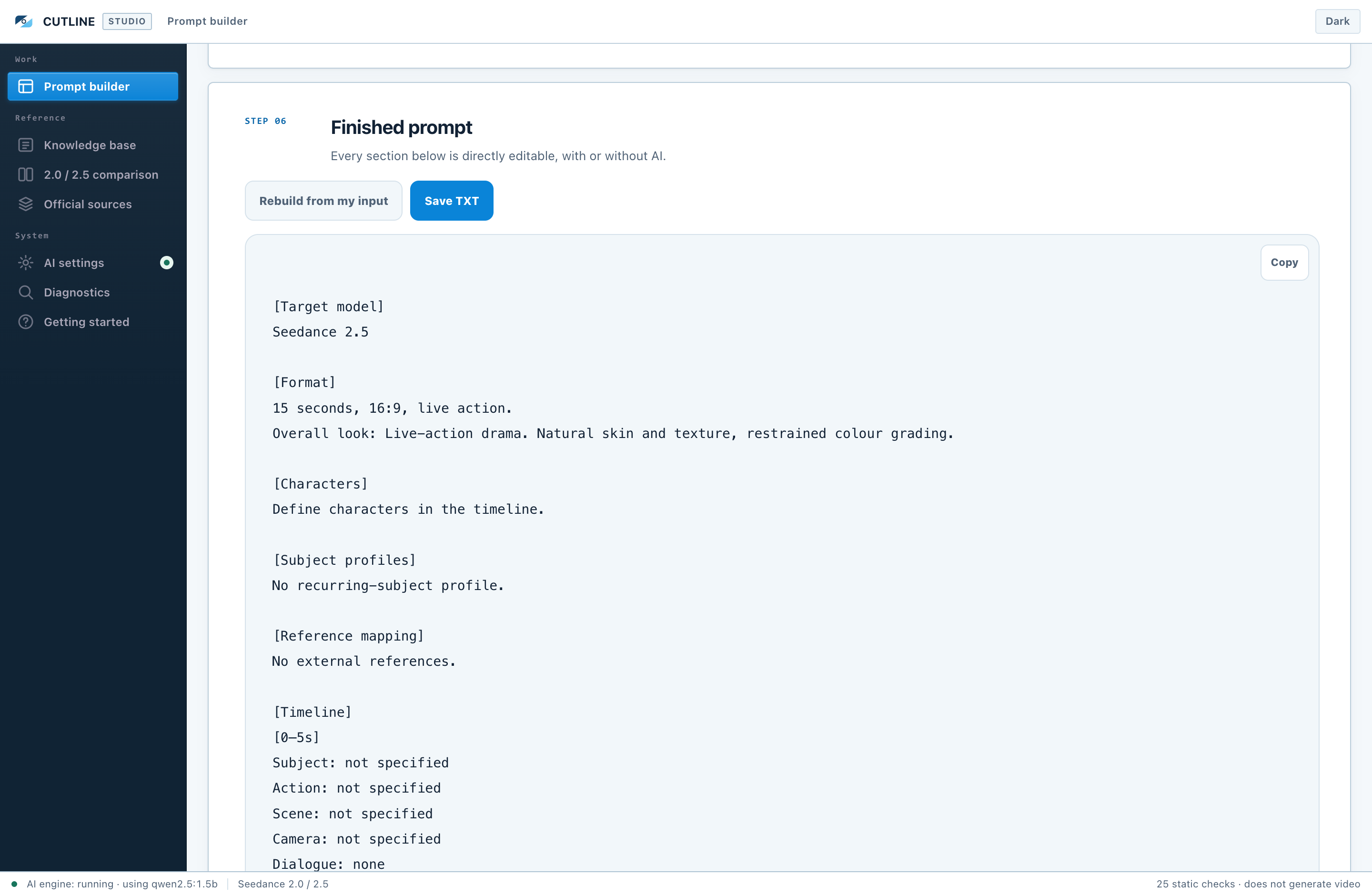
The finished prompt beside the static checks
Output and checks — 25 check results sit beside the finished prompt. Clear them, then copy.
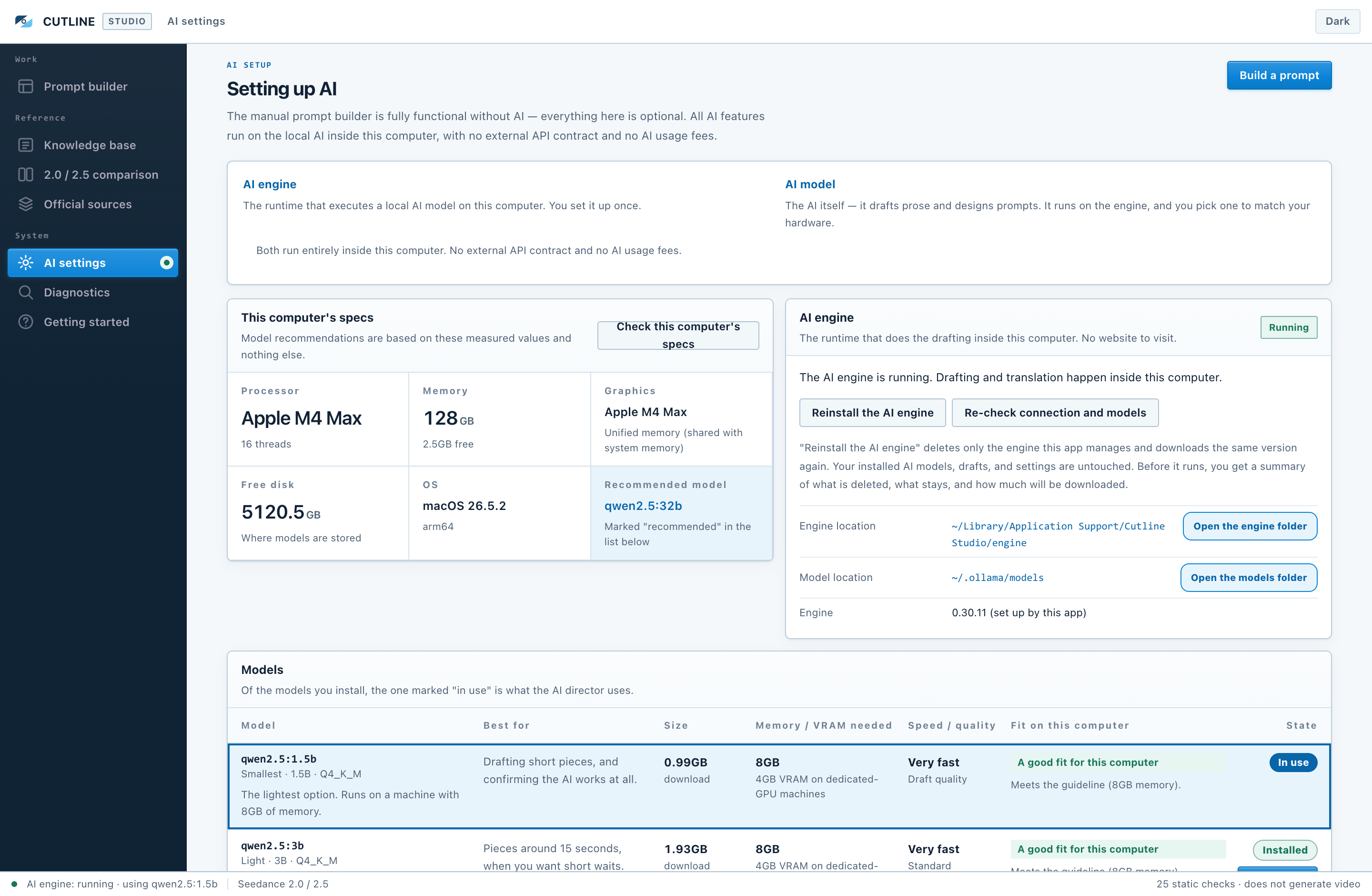
AI settings, with measured specs and the model list
AI settings (paid edition) — measures your machine and tells you, for each of five models, whether it is a good fit. Installing is one button.
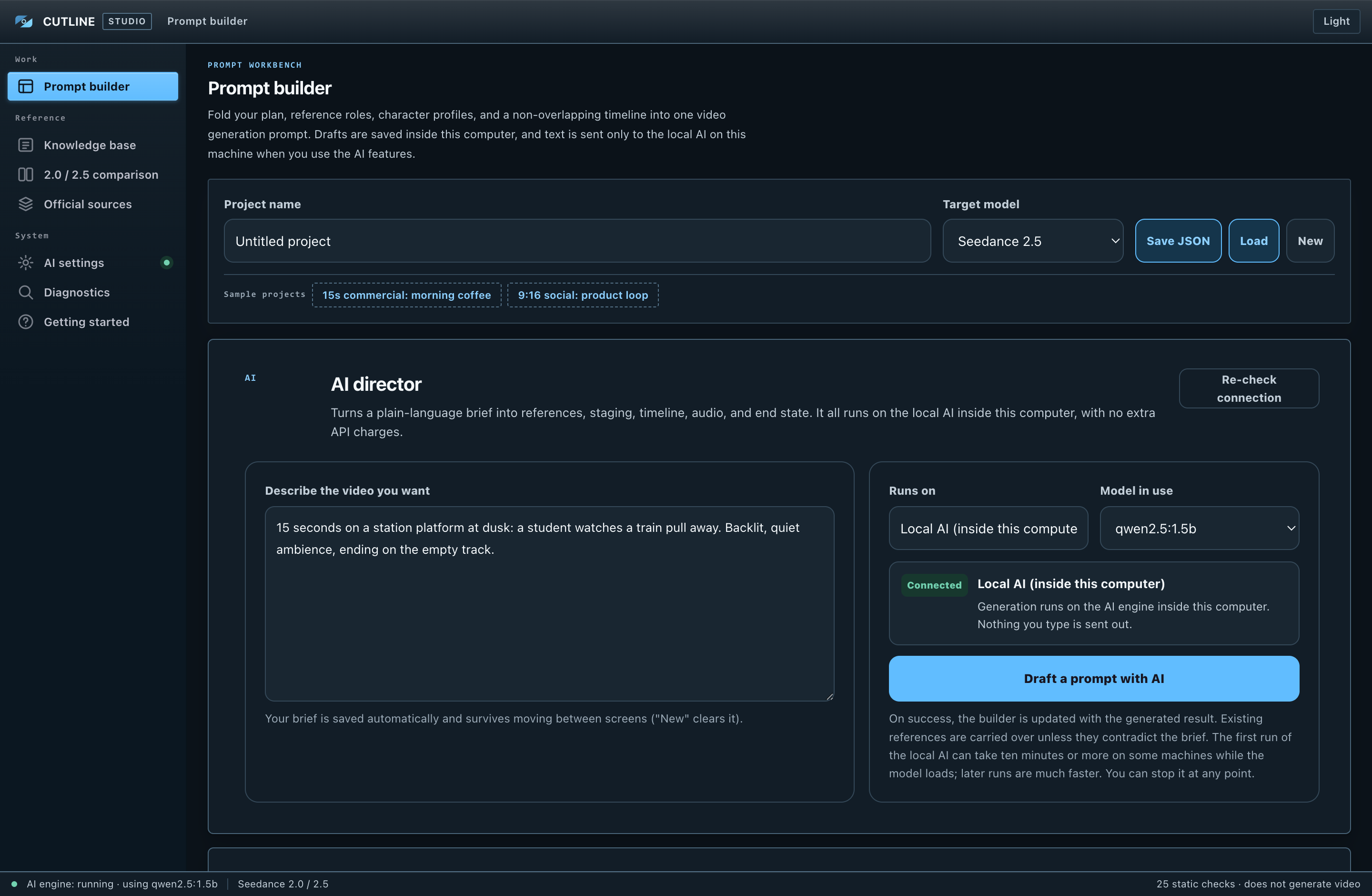
The builder in the dark theme
Dark theme — colours that do not bite at 2am. Light and dark switch in one click.

Free vs Studio

Free and paid — the difference is the AI

Cutline Free is the same desktop app, not a cut-down browser version. No time limit, nothing removed.

FeatureCutline FreeCutline Studio
Desktop app (Mac / Windows)
27 knowledge entries (evidence level and verification date)
Prompt builder (every field)
2.0 / 2.5 switching and comparison
25 static checks
Save / restore as JSON, export as TXT
Measures your machine (AI suitability)
AI drafting of a whole plan
Local AI set up from inside the app
Diagnostics screen (fixes by symptom, reset)

Setup

Three steps. Nothing else to install

No Node.js, no development tools, no terminal. Everything the app needs ships inside it.

Download

Get the Mac PKG or the Windows EXE from the product page.

Install

On a Mac, follow the installer. On Windows, opening it installs it.

Launch

From Applications (Mac) or the desktop (Windows). The first launch shows an OS confirmation because the app is unsigned — the steps are in the manual.

Requirements

Requirements

MacmacOS 14 or later recommended. Universal build for Apple Silicon and Intel
WindowsWindows 10 22H2 or later (64-bit). Verified on real Windows hardware
DiskAbout 600MB for the app. Add the model size if you use the local AI (0.99GB–19.85GB)
Memory (with AI)8GB or more recommended. 16GB or more is comfortable with the standard model (qwen2.5:7b)
Memory (manual use)No requirement. The manual builder is light
NetworkNot needed for the manual builder. Only for the first download of the AI engine and models

Before You Buy

Please read before buying

It does not generate video or audio

This app designs the prompt you paste into a generation service. The generation itself happens on Dreamina or whichever service you use.

The installers are unsigned

On the first launch only, Mac needs right-click → Open and Windows needs More info → Run anyway. It is not a fault and not a virus. If that gives you pause, please do not buy.

Problems are meant to be solved on the spot

The Diagnostics screen inside the app, the manual, and the product page cover isolating a cause through to recovering from it. You can read the whole manual online before buying (Studio manual / Free manual). The same manual ships with the app as a PDF.

External services change

Changes on the Seedance and ByteDance side can change both the result and the available features for an identical prompt. This app helps you write prompts; it does not guarantee what a generation service produces.

One licence covers one computer

To use it on more than one computer, buy one licence per computer. The count is the number of computers actually in use, not whether they are Mac or Windows (a Mac and a Windows machine means two licences). Sharing, transferring, or redistributing the application to third parties is prohibited, as is reverse engineering, decompiling, or disassembling it to obtain or reuse its internal implementation. Nothing in this app restricts personal or commercial use of the prompts you create with it (rights and terms for your input assets, generative AI output, and the services you use remain with their respective owners). The free trial has no limit on the number of computers.

Try the free edition first

Everything except the AI features is in the trial. "Check this computer's specs" in the trial tells you how well the AI would run on your machine before you buy. As a digital product, refunds are not possible after download.
FAQ

Frequently asked questions

Is the app pointless without AI?
No. The knowledge base, the prompt builder, the 2.0/2.5 comparison, the 25 checks, and JSON saving all work with no AI at all. The AI adds automatic drafting on top.
Are my images and videos uploaded?
No. The app only handles text — what role @Image 1 plays. Your plans are stored on your own computer, and there is no server on our side.
Does the local AI cost anything to run?
No. Every AI feature runs on the local AI inside your computer, so there is no extra charge however many times you run it. No external AI contract, no API key, no API billing.
Will it work on an older computer?
The manual builder runs on old machines. The local AI depends on memory. The free trial has "Check this computer's specs" so you can find out before buying.
Does it work with models other than Seedance?
No. It targets Seedance 2.0 and 2.5 only. Keeping the scope narrow is what makes it possible to track specifications down to the date they were verified.
What language is the app in?
English. The interface, the sample projects, the knowledge base, and the prompts it produces are all in English.

Spend the time on the plan, not on organising the prompt.

Try the free edition first, and move up when you want the AI.

Downloads are distributed from the BOOTH product pages. / Studio manual / Free manual